AtriumApp Update: SMS Appointment Confirmation, New Calendar Statuses and Improved Analytics
AtriumApp continues to build useful features for efficiently managing appointments in dental clinics. In this update, we introduced a confirm-or-cancel link in SMS, clear appointment statuses in the calendar, an extended limit for SMS messages, updated analytics and a better display of statuses on the patient page.
Managing appointments becomes simpler and clearer
Efficient appointment management is essential in any dental clinic software. When the front desk, dentists and patients all have access to clear information about an appointment's status, the workflow becomes more predictable, and time lost to non-confirmations or cancellations drops significantly.
The new AtriumApp update brings important improvements in exactly this area. Communication with the patient is faster, the calendar is clearer, and the reports give a more accurate picture of the real situation in the clinic.
A confirm-or-cancel link in SMS for appointments
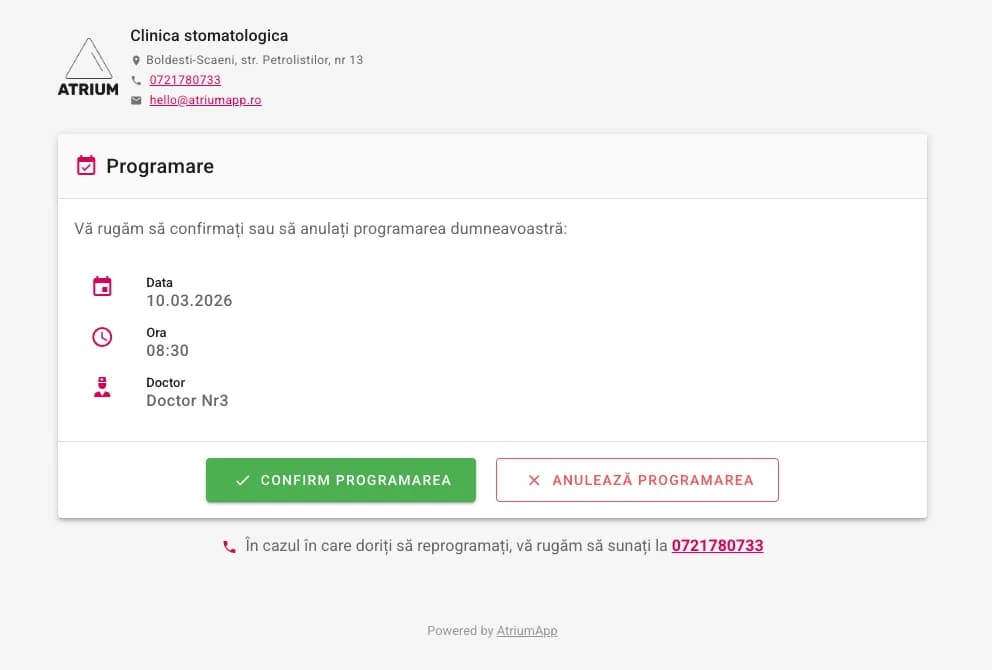
One of the most useful features introduced is the ability to add the [CONFIRM-LINK] variable to the SMS messages sent the day before an appointment. This way, the patient receives a direct link to a dedicated page where they can quickly manage their appointment.
What the patient can do from the link received by SMS
- Confirm the appointment with a single click
- Cancel the appointment through a simple flow, with a confirmation dialog
This feature reduces the need for repetitive phone calls and gives the clinic a modern way to confirm appointments. At the same time, the patient enjoys a simpler, faster experience.
What information appears on the confirmation page
The page accessed from the SMS link automatically displays the relevant details about the clinic and the appointment, so the patient has all the context they need before confirming or canceling.
- The clinic logo
- The clinic address
- The phone number
- The appointment date
- The appointment time
- The doctor assigned to the appointment
- A phone number for rescheduling
In practice, this means the patient does not just receive a reminder message but also a concrete tool to respond right away. For the clinic, the result is better control over the daily schedule and fewer situations where slots go unfilled due to a lack of confirmation.
Appointment statuses visible directly in the calendar
Every appointment now has a clear status, visible directly in the calendar, within complete dental software that helps organize work efficiently:
- Pending - the appointment has no status set
- Confirmed - the patient or staff confirmed the appointment
- Canceled - the appointment was canceled by the patient or staff
- No-show - the patient did not show up for the appointment
The status is changed directly from the appointment edit dialog, through a simple, fast dropdown. This makes updating the information easy to fit into the front desk's everyday work.
For a dental clinic, these statuses are important not only for organization but also for performance analysis: how many appointments are confirmed, how many are canceled and how many turn into no-shows.
SMS character limit raised to 220
To support the new link-based confirmation flow and allow unrestricted use of the available variables, the character limit for appointment SMS messages has been raised from 140 to 220 characters.
This change gives clinics more flexibility when writing messages. The confirmation link can be included more easily, along with the essential appointment details, with no compromises on space.
Messages thus become more complete, clearer and more useful for the patient, which directly contributes to a higher appointment confirmation rate.
Updated analytics for a more accurate picture of appointments
On the analytics page, in the tab dedicated to appointments, important improvements have been made for interpreting the data correctly.
What is new in analytics
- A new chart with all appointment statuses
- Better visibility for confirmed, pending, canceled, no-show and deleted
- Corrected counting logic for appointments that were canceled and then deleted
Here is an important example: if an appointment was canceled and later deleted, it will be counted as canceled, not as deleted. This logic reflects the clinic's operational reality more faithfully and helps with the correct interpretation of the metrics.
For clinic managers and the front desk, these analytics are useful for assessing the confirmation rate, the number of cancellations and the frequency of no-shows. In other words, the data becomes more relevant for decision-making.
Appointment statuses are also visible on the patient page
The update does not stop at the calendar and analytics. In the patient's appointment list, each appointment now shows its current status through a colored chip that is easy to spot.
This way, clinic staff can quickly check whether an appointment is confirmed, pending, canceled, marked as a no-show or deleted. This consistency across the calendar, the patient record and the analytics contributes to a clearer workflow and fewer interpretation errors.
An explanatory guide in the calendar for understanding statuses
To make the new statuses as clear as possible, an explanatory card has been added to the calendar help dialog, accessible via the ? button.
This guide describes each status and explains the difference between canceling an appointment and deleting it. It is a useful addition for teams that want to use AtriumApp more efficiently and standardize how they manage appointments.
Why these features matter for a dental clinic
In a dental clinic, every slot that unexpectedly opens up in the schedule can mean lost time and missed revenue. That is why fast appointment confirmation and clear visibility into statuses are essential.
Through this update, AtriumApp helps clinics to:
- communicate more efficiently with patients;
- reduce the number of unconfirmed appointments;
- track cancellations and no-shows more clearly;
- interpret analytics data more accurately;
- better organize the work of the front desk and dentists.
These improvements are part of AtriumApp's direction of delivering modern dental software focused on efficiency, clarity and automation.
Frequently asked questions about the new AtriumApp update
What is the [CONFIRM-LINK] variable in SMS?
It is a variable that can be added to the SMS messages sent to patients before their appointment. It automatically generates a link through which the patient can confirm or cancel the appointment.
Can the patient confirm the appointment without calling the clinic?
Yes. The patient can confirm the appointment directly from the link received by SMS, with a single click.
What statuses can be set for an appointment?
Appointments can have the statuses: pending, confirmed, canceled and no-show.
Where is an appointment's status changed?
The status is changed directly from the appointment edit dialog, through a simple dropdown.
How many characters can an appointment SMS have now?
The limit has been raised to 220 characters, to allow the confirmation link and the available variables to be included.
Does analytics correctly handle appointments that were canceled and then deleted?
Yes. If an appointment is canceled and then deleted, it is counted as canceled, for a correct interpretation of the data.